
Chats Analytics – General Overview
The Chats Analytics section provides a comprehensive view of all chat interactions handled by your system across online and offline hours. It includes chats managed by agents, bots, or a combination of both, along with performance and responsiveness metrics.
Below is a detailed explanation of each metric shown on this page.
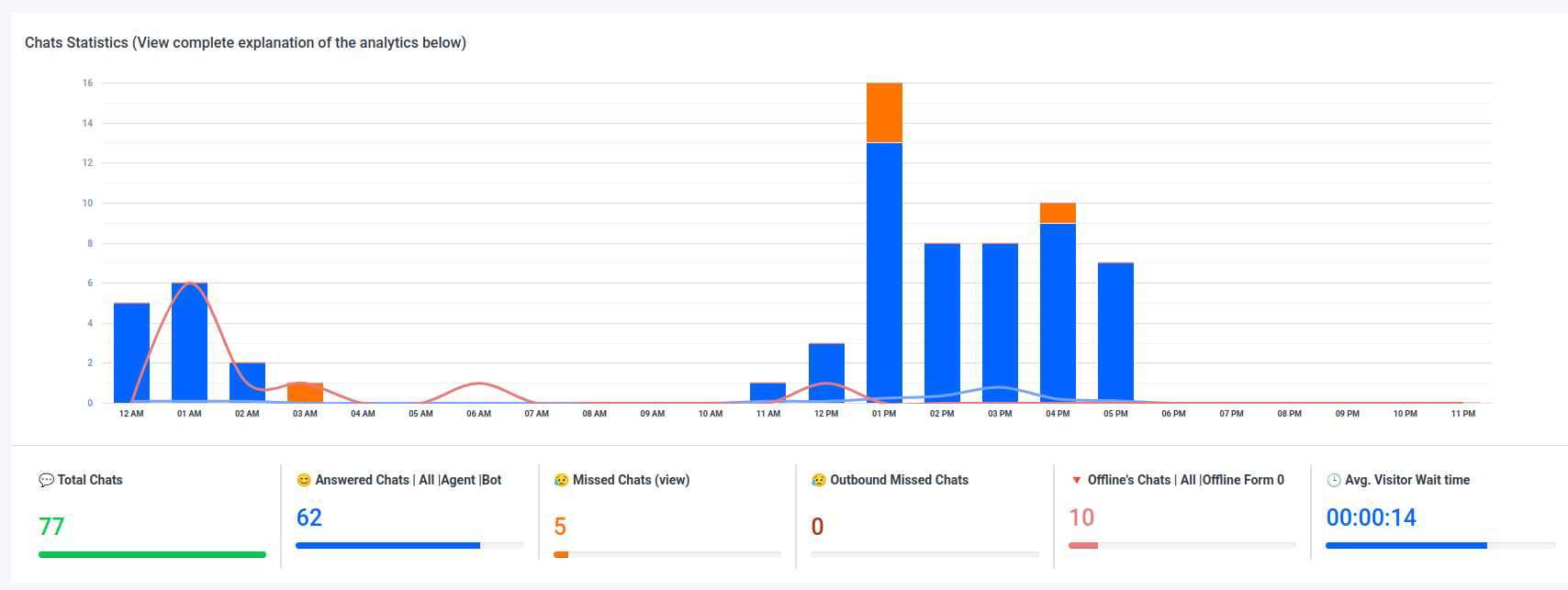
1. Total Chats
Total Chats represents the total number of chat conversations initiated by visitors during the selected time period.
This metric includes:
Chats received during online hours
Chats received during offline hours
Chats handled by agents
Chats handled by bots
Chats that involved both bots and agents
Each chat session is counted once, regardless of how many messages were exchanged within it.
2. Answered Chats (All)
Answered Chats indicates the total number of chats that received a response.
This includes chats that were:
Answered by agents
Answered by bots
Started with a bot and later transferred to an agent
If a visitor received at least one response (from a bot or an agent), the chat is counted as answered.
3. Answered Chats by Agents
Answered Chats by Agents counts all chats that were handled by a human agent.
This includes:
Chats directly answered by an agent
Chats that were initially handled by a bot and later transferred to an agent
If an agent interacted with the visitor at any point during the chat session, the chat is included in this metric.
4. Answered Chats by Bots Only
Answered Chats by Bots Only represents chats that were fully handled by the bot without any agent involvement.
This includes:
Chats answered exclusively by the bot
Chats where the bot did not transfer the conversation to an agent
Chats with no agent messages or interactions
These chats indicate successful self-service interactions handled entirely by automation.
5. Missed Chats
Missed Chats refers to the total number of chats that were not answered by any agent during online hours.
A chat is considered missed when:
A visitor initiates a chat during online hours
No agent responds to the chat
The chat does not receive any agent interaction
Bot responses do not prevent a chat from being marked as missed unless an agent also responds (based on your system configuration).
6. Outbound Chats
Outbound Chats represents the total number of chats initiated by agents.
This includes:
Proactive messages sent by agents to visitors
Chats where agents reached out to visitors without the visitor starting the conversation
Outbound chats help track proactive engagement efforts by your support or sales teams.
7. Offline Chats
Offline Chats includes all chat requests received while no agents were available (offline hours).
This metric captures:
Visitor attempts to start a chat outside business hours
Chats received when the system or department was set to offline mode
8. Offline Form Submissions
Offline Form Submissions represents the number of offline chats where visitors submitted an offline form.
This includes:
Chats initiated during offline hours
Visitors who filled out and submitted the offline contact form (such as name, email, and message)
These submissions allow agents to follow up once they are back online.
9. Average Visitor Wait Time
Average Visitor Wait Time shows the average time a visitor waited before their chat was picked up.
This time is calculated from:
The moment the visitor initiates a chat
toThe moment the chat is first answered by a bot or an agent
The metric helps measure responsiveness and overall chat experience efficiency.